<!DOCTYPE html>
<html lang="en">
<head>
<meta charset="UTF-8">
<meta name="viewport" content="width=device-width, initial-scale=1.0">
<title>Student Registration Form</title>
<style>
body {
background: linear-gradient(135deg, #f1f5f9, #e2e8f0);
font-family: Arial, sans-serif;
padding: 25px 15px;
margin: 0;
}
.reg-card {
background: #ffffff;
max-width: 580px;
margin: 0 auto;
padding: 30px;
border-radius: 10px;
box-shadow: 0 8px 24px rgba(0, 0, 0, 0.12);
}
h2 {
text-align: center;
color: #1e3a8a;
margin-top: 0;
margin-bottom: 20px;
}
label {
font-weight: 600;
color: #334155;
display: block;
margin-bottom: 5px;
font-size: 14px;
}
.inline-label {
display: inline-block;
font-weight: normal;
margin-right: 15px;
cursor: pointer;
}
input[type="text"],
input[type="password"],
textarea,
select {
width: 100%;
padding: 9px 12px;
margin-bottom: 16px;
border: 1px solid #cbd5e1;
border-radius: 5px;
box-sizing: border-box;
font-size: 14px;
}
.required-star {
color: #ef4444;
}
.dob-row {
display: flex;
gap: 10px;
margin-bottom: 16px;
}
.dob-col {
flex: 1;
}
.btn-wrap {
margin-top: 10px;
display: flex;
gap: 12px;
}
input[type="submit"] {
flex: 1;
background-color: #6366f1;
color: white;
padding: 11px 20px;
border: none;
border-radius: 5px;
cursor: pointer;
font-size: 15px;
font-weight: 600;
}
input[type="reset"] {
background-color: #64748b;
color: white;
padding: 11px 20px;
border: none;
border-radius: 5px;
cursor: pointer;
font-size: 15px;
}
</style>
</head>
<body>
<form action="right_frame.html" onsubmit="return validateForm()" class="reg-card">
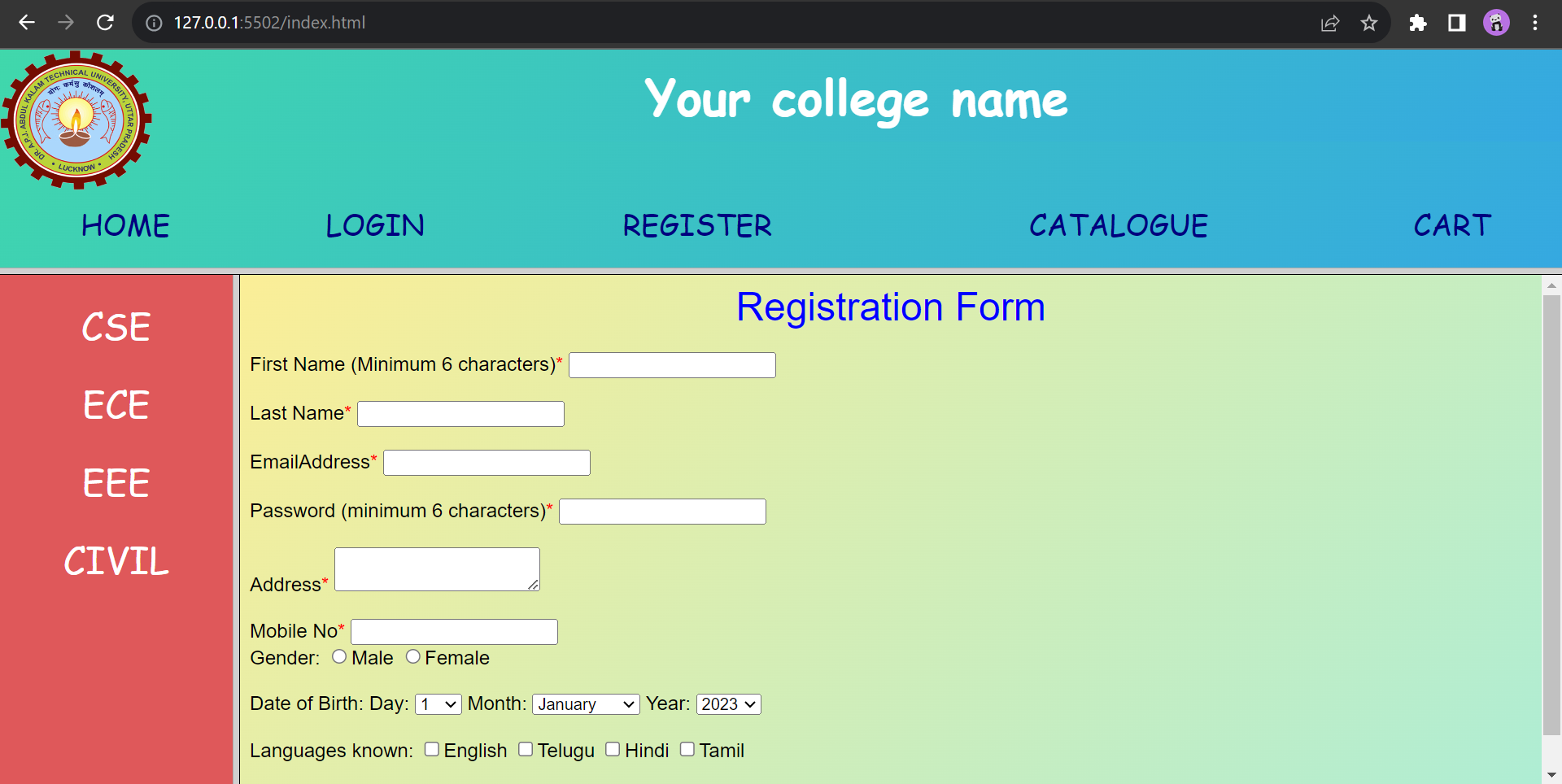
<h2>Student Registration Form</h2>
<label for="firstname">First Name (Min. 6 alphabets)<span class="required-star">*</span></label>
<input type="text" id="firstname" placeholder="e.g. Rajesh Kumar" required>
<label for="lastname">Last Name<span class="required-star">*</span></label>
<input type="text" id="lastname" placeholder="e.g. Sharma" required>
<label for="email">Email Address<span class="required-star">*</span></label>
<input type="text" id="email" placeholder="student@aktu.ac.in" required>
<label for="pass">Password (Min. 6 characters)<span class="required-star">*</span></label>
<input type="password" id="pass" placeholder="••••••••" required>
<label for="addr">Permanent Address<span class="required-star">*</span></label>
<textarea rows="2" id="addr" placeholder="Hostel / Residential Address" required></textarea>
<label for="mobileno">Mobile Number (10 Digits)<span class="required-star">*</span></label>
<input type="text" id="mobileno" placeholder="9876543210" required>
<label>Gender:<span class="required-star">*</span></label>
<div style="margin-bottom: 16px;">
<label class="inline-label"><input type="radio" name="gender" value="Male" required> Male</label>
<label class="inline-label"><input type="radio" name="gender" value="Female" required> Female</label>
</div>
<label>Date of Birth:<span class="required-star">*</span></label>
<div class="dob-row">
<div class="dob-col">
<select id="day" name="day" required></select>
</div>
<div class="dob-col">
<select id="month" name="month" onchange="updateDays();" required>
<option value="January">January</option>
<option value="February">February</option>
<option value="March">March</option>
<option value="April">April</option>
<option value="May">May</option>
<option value="June">June</option>
<option value="July">July</option>
<option value="August">August</option>
<option value="September">September</option>
<option value="October">October</option>
<option value="November">November</option>
<option value="December">December</option>
</select>
</div>
<div class="dob-col">
<select id="year" name="year" onchange="updateDays(); updateYears();" required></select>
</div>
</div>
<label>Languages Known:</label>
<div style="margin-bottom: 20px;">
<label class="inline-label"><input type="checkbox" name="language" value="English"> English</label>
<label class="inline-label"><input type="checkbox" name="language" value="Hindi"> Hindi</label>
<label class="inline-label"><input type="checkbox" name="language" value="Telugu"> Telugu</label>
<label class="inline-label"><input type="checkbox" name="language" value="Tamil"> Tamil</label>
</div>
<div class="btn-wrap">
<input type="submit" value="Submit Registration">
<input type="reset" value="Reset">
</div>
</form>
<script>
function updateDays() {
var month = document.getElementById('month').value;
var daySelect = document.getElementById('day');
var yearVal = document.getElementById('year').value || new Date().getFullYear();
var daysInMonth = new Date(
yearVal,
new Date(Date.parse(month + " 1, 2000")).getMonth() + 1,
0
).getDate();
var currentDay = daySelect.value;
daySelect.innerHTML = '';
for (var i = 1; i <= daysInMonth; i++) {
var option = document.createElement('option');
option.value = i;
option.text = i;
daySelect.add(option);
}
if (currentDay && currentDay <= daysInMonth) {
daySelect.value = currentDay;
}
}
function updateYears() {
var yearSelect = document.getElementById('year');
var currentYear = new Date().getFullYear();
yearSelect.innerHTML = '';
for (var i = currentYear; i >= 1920; i--) {
var option = document.createElement('option');
option.value = i;
option.text = i;
yearSelect.add(option);
}
}
updateYears();
updateDays();
function validateForm() {
var name = document.getElementById('firstname').value.trim();
if (!/^[a-zA-Z ]{6,}$/.test(name)) {
alert("First Name should contain alphabets only and have a minimum length of 6 characters.");
document.getElementById('firstname').focus();
return false;
}
var password = document.getElementById('pass').value;
if (password.length < 6) {
alert("Password should be at least 6 characters long.");
document.getElementById('pass').focus();
return false;
}
var email = document.getElementById('email').value.trim();
if (!/^[\w\.-]+@[a-zA-Z\d\.-]+\.[a-zA-Z]{2,}$/.test(email)) {
alert("Invalid email address. Please enter a valid email (e.g. name@domain.com).");
document.getElementById('email').focus();
return false;
}
var phoneNumber = document.getElementById('mobileno').value.trim();
if (!/^\d{10}$/.test(phoneNumber)) {
alert("Phone number should contain exactly 10 numeric digits.");
document.getElementById('mobileno').focus();
return false;
}
alert("All fields validated successfully! Redirecting...");
return true;
}
</script>
</body>
</html>